
5.2. Phase Planning and Takt Planning
Takt Planning is a recent addition to the improved Last Planner System® (LPS) and is now recognized as an important part of Phase Planning within the overall framework of LPS. Takt when implemented properly helps teams create phase plans that are designed to flow from the start. vPlanner enables teams to incorporate those takt plans to create clear execution strategies at the phase level which can then be used to flow into the make ready process. When there are phases of work that are so unique that a simple reverse phase plan will suffice to manage the work, teams can take advantage of vPlanner's unique capabilities to integrate the takted phases of a project with those that are not and synchronize both kinds of workstreams to prioritize the work and achieve project goals.
There are two recognized complementary approaches to takt planning one is Strategic Takt Planning and the other is Operational Takt Planning. We recommend that our users use those where applicable on their projects to improve the flow of work.
Strategic Takt Planning is a foundational step in project production system design, distinct from the more commonly used Operational Takt Planning.
Strategic Takt Planning occurs early in the project, during validation or schematic design, and is used to define multiple feasible project execution strategies before detailed design or trade contractor engagement. It informs future stakeholders about expected capacity allocations, supply chain alignment, and just-in-time delivery needs. Without this early planning, Operational Takt Planning may be misaligned with contractual and logistical realities, leading to inefficiencies or the need for contract adjustments.
Please make time to review the below webinar for an overview of Strategic Takt Planning offered by Samir Emdanat, President of vPlanner offered in collaboration with the Lean Construction Institute.
Webinar on Strategic Takt Planning
There is increasing confusion in the industry about takt planning and many takt plans we encounter visually look like takt plans but they lack the analysis and rigor required to for reliable execution. If you find yourself unable to execute a takt plan and maintain flow and observe the field crews are constantly having to adjust the takt plan during execution, then it is likely that the takt plan itself need to be redone. At vPlanner our management consulting team has extensive experience in takt production controls and we offer hands-on workshops in which we use simulations and group discussions to introduce both strategic and operational takt planning principles to project teams. We encourage you to reach out to us team via our website if you are interested in implementing takt planning properly into your workflow.
|
Takt Plan Fundamentals
To create a takt plan in vPlanner you need to do four things:
-
Identify a phase of work and a rough total duration for the phase.
-
Setup the location structure (locations including floors using the Floors attribute, Takt Zones using the Zone attributes, or Takt Elevations using the elevations attribute).
-
Create an agreed upon standard process. You can use the Pull, the Sandbox or the Manage View to do that.
-
Perform takt analysis to either at the strategic level or at the operations level to identify the takt target for the phase.
Once you have your takt analysis complete you are ready to create your takt plan and integrate it into the overall production system which may also include non-takt pull plans.
Steps for Representing a Takt Plan in vPlanner
-
Hide all tasks except for the standard process (now updated with the takt duration).
-
Copy and Paste the standard process and assign each new copy to the target zone.
-
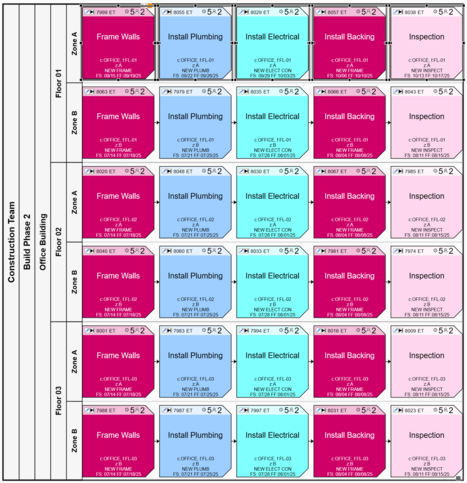
Arrange the result to form a table using the swimlanes composer. Rows will represent the locations and columns will represent the standard process steps.
-
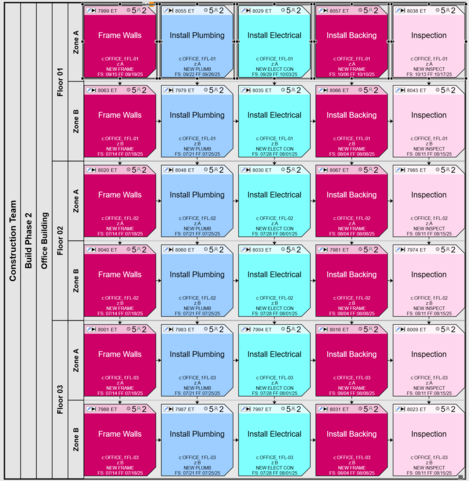
Select the first row and use the Manage Links -> Resource Link Production Activities to automatically build the crew flow.
-
Optionally - convert the resulting tasks to Production Activities.
-
Visualize the plan using the Swimlanes Composer with the Auto dates option turned on to automatically detect the takt duration.
-
Link the takt plan to milestones or other parts of the production system.
 |
 |
|
Before applying Resource Links
|
After applying Resource Links
|
The below short video illustrates the process of creating a takt plan using vPlanner.
Creating a Takt Plan