5.1. Milestone Planning
Milestones set the goals for the production system. Teams can draw on experience from past similar projects, production rates, or through running analytical execution strategies using takt of various possible scenarios to arrive a reasonable milestone plan for the project.
Milestones need to define the boundaries of work phases. Work phases are self contained chunks of work of similar processes that overlap to create the overall project execution strategy. Phase durations while they may be arrived at though detailed analysis should not contain detailed activities when they are captured in the initial execution strategy. They should only include start and finish dates of the project phases.
Milestone plans are then validated through phase planning or operational takt planning and through collaboration with the selected teams that would be involved in work execution and at that point their details should be captured in vPlanner.
A good milestone plan is one that defines what success looks like through clear and measurable goals. They should also clearly define external imposed milestones outside of the team's control and also planning markers which are within the team's control to help the team measure progress. Milestone plans should be validated repeatedly throughout the project life cycle as new information becomes available.
vPlanner facilitates milestone planning by enabling teams to visually map out milestones within the project execution strategy so that they are ready to be linked to phase plans or takt plans. All participants will be able to filter the plans to see the milestones and the impact of the work on each milestone. This promotes transparency, collaboration, and accountability.
Teams can then use vPlanner to collaborate on defining work sequences to achieve each milestone during phase planning sessions, ensuring that each task contributes directly to milestone achievement.
By integrating milestone planning into the digital workflow, vPlanner helps teams maintain alignment between long-term goals and short-term actions. Guided by the enhanced metrics available in vPlanner (i.e. Commitment Level, and Percent Required Complete), teams are able to work on what is needed, when it is needed, and where it is needed to stay on track.
vPlanner offers three types of Milestones for managing production.
-
Start Date: indicates the start date of something represented by the user provided Required Start (RS) date provided by the user. The start time of the Start Date milestone is the morning of that day.
-
Planning Marker: indicates an intermediate target date for finishing something within the team's control represented by the Required Finish (RF) date provided by the user.
-
Milestone: indicates a major target date for finishing something owed to an external entity to the team represented by the Required Finish (RF) date provided by the user.The finish time of a Planning Marker or Milestone is the end of the day of the required date assigned to them.Note: Milestones in vPlanner can have a duration assigned to them which is more flexible than CPM tools which require them to have a zero duration. If your goal is to export to CPM tools we recommend to keep milestones as zero duration tasks for backwards compatibility with those tools.
Reporting on Milestones
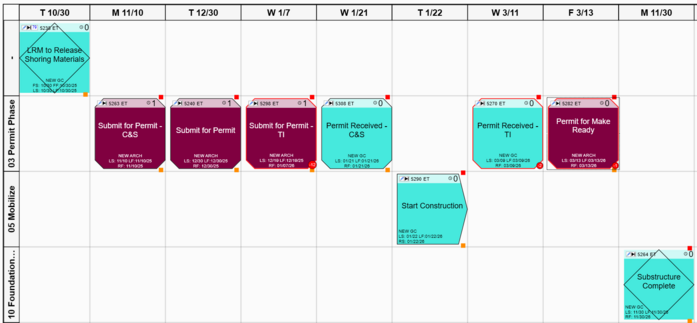
Use the task filter to identify all Milestones, Planning Markers, and Start Dates associated with the entire project, or a specific attribute in the project (like a team, location, or a phase of work) and organize the result into a swimlane with dates. The recommended swimlanes date/time setting is the Exact option in the swimlanes composer so that you do not end up with many empty columns since milestones can potentially span several years. When milestones run late, vPlanner will place a red dot to indicate how many days late it is.